
Hyundai Santa Fe (TM): Convenience features / Head-Up Display (HUD)

The Head-Up Display is an optional feature that allows the driver to view information projected onto a transparent screen while still keeping your eyes safely on the road ahead while driving.
Head-up display settings
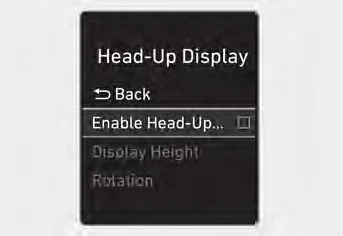
- Head-up display can be enabled from the Settings menu in the User Settings
mode on the instrument cluster LCD display. Select:
- Setup -> Head-Up Display -> Enable Head-Up Display - After turning on the head-up display, you can change the settings of ‘Display Height’ and ‘Content Selection’ of the Head-Up Display.
Head-up display information
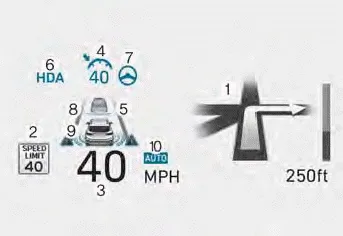
1. Turn by Turn (TBT) navigation
2. Traffic
3. Speedometer
4. SCC set speed
5. SCC Vehicle distance
6. Highway Driving Assist
7. Lane Following Assist
8. Lane Safety
9. Blind-Spot Safety
10. Highway Auto Speed Change
Information
If you select Turn By Turn (TBT) navigation information as Head-Up Display contents, the Turn By Turn (TBT) navigation information will not be displayed in the instrument cluster LCD display.
Precautions while using the head-up display
- It may sometimes be difficult to read information on the Head-Up Display
in the following situations.
- The driver is improperly positioned in the driver’s seat
- The driver wears polarizing-filter sunglasses
- An object is located above the head-up display cover
- The vehicle is driven on a wet road
- Any improper lighting accessory is installed inside the vehicle, or there is incoming light from outside of the vehicle
- The driver wears glasses
- The driver wears contact lenses
When it is difficult to read the Head- Up Display information, adjust the image height or brightness level from the Settings menu in the infotainment system screen. - For your safety, make sure to stop the vehicle before adjusting the settings.
- Do not tint the front windshield glass or add other types of metallic coating. Otherwise, the Head-Up Display image may be invisible.
- Do not place any accessories on the crash pad or attach any objects on the windshield glass.
- When replacing the front windshield glass, replace it with a windshield glass designed for Head-Up Display operation. Otherwise, duplicated images may be displayed on the windshield glass.
WARNING
Blind-Spot Collision Warning warnings on the Head-Up Display are supplemental. Do not solely depend on them to change lanes. Always take a look around before changing lanes.
Hood Opening the hood 1. Park the vehicle and set the parking brake. 2. Pull the release lever to unlatch the hood. The hood should pop open slightly.
Exterior lights Lighting control To operate the lights, turn the knob at the end of the control lever to one of the following positions: 1. OFF 2. AUTO headlight 3.
Other information:
Hyundai Santa Fe (TM) 2019-2023 Service and Repair Manual: Rear Glass Defogger
Components and components location Component Location 1. Rear glass defogger relay (Buil-in engine room relay box) 2. Rear glass defogger switch (Dual type) 3. Rear glass defogger switch (Manual type) 4.
Hyundai Santa Fe (TM) 2019-2023 Service and Repair Manual: Rear Occupant Alert
Description and operation Description The system detects the passenger in the vehicle and prevents the driver from getting off the vehicle with the passenger in the back. - 1st warning: If you open the driver's door after you open and then close the rear passenger and turn the engine off, the system provides warn
Categories
- Manuals Home
- Hyundai Santa Fe Owners Manual
- Hyundai Santa Fe Service Manual
- LCD Display
- Auto Hold. Warning messages
- Front Radar Unit. Repair procedures
- New on site
- Most important about car
